 Dagobang
Pay less in fees. Trade with Dagobang.
A multi-chain browser extension for high-frequency meme trading
Open the floating panel directly on GMGN, Axiom, Four.Meme and similar pages to trade, place orders, and run monitoring workflows.
Self-custody · Limit orders / auto-sell · Tweet & new-coin sniping
Chrome / Edge supported · 1 min Fast Install
Preferred for Advanced Web3 Players
Current version is in beta. Only for users with Web3 experience. Please use after understanding the risks.
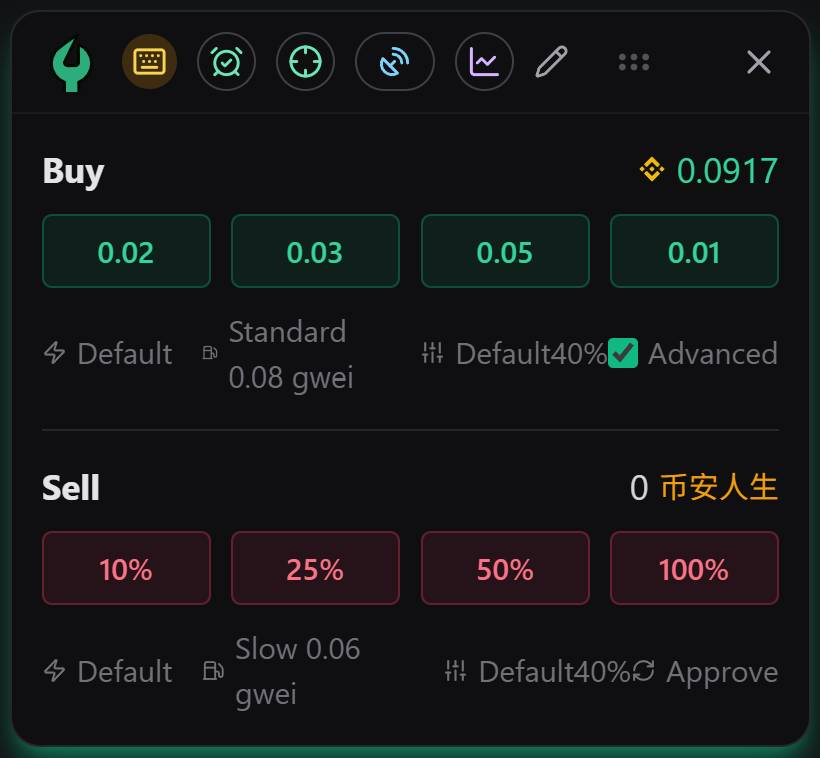
Core Advantages
Born for High-Frequency Trading
From multi-chain execution to automation strategies, Dagobang tries to keep the most important meme-trading tools inside one extension.
Ultra-low Fees
The extension-side fee is currently 0% during cold start, with a planned cap within 0.1%, keeping additional trading overhead as low as possible.
Multi-Chain & Multi-Wallet
The current codebase already supports BSC, Ethereum, Hyperliquid EVM, and Solana, with per-chain wallets, trade settings, RPC paths, and broadcast controls.
Limit Orders & Auto-Sell
Supports Low Buy, High Buy, TP, SL, Trailing Stop, plus advanced post-entry strategies such as fixed TP/SL ladders and rolling take profit.
Monitoring & Sniping
Includes tweet monitor, tweet sniper, new-pool monitor, token sniper, and new-coin sniper with filters, WS confirmation, and rapid-exit logic.
Execution & Broadcast Tuning
Supports custom RPC, Protect RPC, private broadcast paths, optional bloXroute, and Solana SWQoS to reduce latency between signal and submission.
Non-custodial Keys
Seed phrases and private keys stay encrypted locally, with signing performed inside the browser instead of relying on a custodial backend.
How Dagobang Works?
Detect chain and token context
When you open a supported market, token, or address page, Dagobang tries to detect the current chain, token address, and page context.
Load quote, wallet, and market state
The extension uses your configured RPCs and chain interfaces to load quotes, balances, pool data, and the execution context needed for trading.
Configure trade or strategy locally
You can place a manual trade, create limit orders, enable advanced auto-sell, or run tweet / new-coin sniper tasks from the floating workspace.
Sign locally and broadcast through multiple paths
After unlock and authorization, Dagobang signs inside the browser and can submit through RPC, Protect RPC, private broadcast routes, or Solana SWQoS.
Keep tracking orders, positions, and tasks
After submission, you can continue to manage orders, monitor signals, and let auto-sell or sniper workflows keep running inside the same toolchain.
How to Install Dagobang Plugin (Chrome / Edge)
Start your high-speed trading journey in 4 simple steps
Open Chrome Web Store
Open the Dagobang listing and click “Add to Chrome”.
Confirm Installation
Click “Add extension” in the popup and wait for the install to complete.
Pin the Extension
Click the puzzle icon in the toolbar, find Dagobang, and pin it for quick access.
Open & Start Trading
Open a supported chart site and launch Dagobang from the pinned icon.
With Anti‑MEV enabled, your tx is broadcast via Protect RPC endpoints in a race. If you only use them for sending transactions, free plans are usually enough. We recommend 3–4 endpoints, preferably in the same region as your VPN exit (e.g., HK/SG).
See FAQ: setup & recommendationsReady to start?
Open the Chrome Web Store page and add Dagobang to your browser.
Open Chrome Web StoreSupports Windows & Mac
Non-custodial design, security model and risk boundaries
Dagobang is a local browser extension. It does not custody your assets or private keys. We aim to balance UX and safety, but like any hot wallet the real security boundary is your device environment and personal practices.
Local non‑custodial storage
Your seed phrase and private keys are encrypted and stored only in the browser, never on our servers. The encryption key is derived from the password you choose, and you can lock or reset it at any time.
Zero backend dependency
Dagobang talks directly to blockchain nodes and DEX or aggregator APIs. There is no proprietary custody backend in the middle, reducing single‑point failure and centralised data leakage risks.
Least privilege permissions
The extension only requests the minimal browser permissions it needs, such as storing configuration and accessing the active tab. You can review and revoke these permissions in your browser at any time.
Boundaries of silent signing
Once you unlock and grant permissions, Dagobang can silently sign in agreed‑upon scenarios to avoid repeated popups and improve high‑frequency trading experience. Only enable and use this if you fully understand and accept how it works.
Security model compared to MetaMask
From a cryptographic perspective, Dagobang is on the same level as mainstream browser wallets. The key differences are in UX and target use cases.
In short: for local encryption and non‑custodial design Dagobang is comparable to MetaMask. What primarily determines your risk is how clean your device is, how you manage approvals and how much capital you keep in hot wallets.
Important risk notice
- •Trading digital assets and meme tokens is extremely risky and may result in partial or total loss of principal due to volatility, project failure, contract bugs, hacks or regulatory changes.
- •Dagobang is a browser extension only. It is not investment advice, a financial product or any form of yield guarantee.
- •All trades conducted through Dagobang are based on your own judgement. You bear full responsibility for any outcomes.
- •Dagobang does not guarantee the security, reliability or legality of any third‑party websites, smart contracts, protocols or projects you interact with.
- •Before using the extension, ensure that participation in relevant digital‑asset activities is permitted in your jurisdiction and that you understand and comply with all applicable laws and regulations.
- •To the maximum extent permitted by law, the Dagobang team is not liable for any direct or indirect loss arising from the use of, or reliance on, the extension or any information it provides.
FAQ
Here are a few common questions. For more, feel free to contact us at the bottom.
Contact SupportNo. Dagobang follows a non-custodial model: seed phrases and private keys are stored encrypted in your local browser environment, and signing happens locally instead of on our servers.
The extension-side fee is currently 0% during cold start and is planned to stay within 0.1% later. You still pay on-chain Gas, Priority / Tip, and DEX or aggregator protocol fees.
Silent signing can significantly reduce interruptions and improve experience, but it also reduces manual confirmation steps. Please use it only after confirming the reliability of the installation package source, fully understanding the working principle, and trusting this plugin.
No. Dagobang is an independently developed third-party tool and has no official cooperation or affiliation with any chart platform.
Custom privacy RPC can avoid all requests being concentrated on public nodes, reducing the risk of rate limiting, monitoring, or front-running, while improving stability and response speed under high-frequency trading. You can also continue to use the default RPC without any modification.
The current codebase already supports BSC, Ethereum, Hyperliquid EVM, and Solana. Support depth may vary by site and execution path, but Dagobang is no longer a single-chain tool.
After you unlock the extension, the decrypted key temporarily lives in local browser memory. In silent-signing scenarios, Dagobang uses that key locally to sign without opening a popup for every trade, trading one layer of confirmation for faster execution. You can lock the extension at any time to clear the unlocked state and return to a more conservative workflow.
In the extension settings, enter one RPC URL per line. It is recommended to mix endpoints from different providers, for example a combination of public and paid nodes, and to prioritize official or reputable providers you trust. This helps balance speed, stability and privacy instead of relying on a single crowded public endpoint.
Protect RPC is mainly used for broadcasting signed transactions (sending tx). The traffic is small, so free plans are usually enough. Setup (Popup → Settings): 1) Network: put read/quote RPCs under RPC URLs (multiple is fine) 2) Turn on Anti‑MEV 3) Add 3–4 endpoints under Protected RPC URLs (one per line, mix providers) 4) Save Tips for HK/SG VPN: - Prefer endpoints close to your VPN exit region (SG/HK) to reduce RTT - Mix 1 stable provider + 1 trading-oriented provider + 1–2 backups - Don't add too many endpoints to avoid rate-limits / risk control Copy-paste template (replace YOUR_KEY with yours, never share real keys): https://bsc-mainnet.nodereal.io/v1/YOUR_KEY https://bsc-mainnet.core.chainstack.com/YOUR_KEY https://bsc.blockrazor.xyz/YOUR_KEY https://go.getblock.io/YOUR_KEY
Contact & Direction
Dagobang is still moving fast, but it is already more than an early quick-buy tool. It is becoming a broader multi-chain meme-trading workspace.
Current Capabilities & Next Direction
Live TodayCurrent
- Multi-chain trading, multi-wallet management, and in-page floating execution.
- Limit orders, advanced auto-sell, trailing stop, and rolling take-profit workflows.
- Tweet monitor, tweet sniper, new-pool monitor, token sniper, and new-coin sniper.
Current Focus
- Keep strengthening RPC, private broadcast, Protect RPC, and Solana SWQoS submission paths.
- Improve site compatibility, execution stability, and auto-task workflows.
Next Direction
- Build out richer review, analysis, reminders, and more detailed strategy orchestration.
- Keep expanding automation, risk controls, and more chains / platforms.